Calendar
Updated 10 October 2026
Calendar keeps your days in one place: your own events, the tasks that are due, your scheduled routines, bank holidays and the moon. Each kind has its own colour.
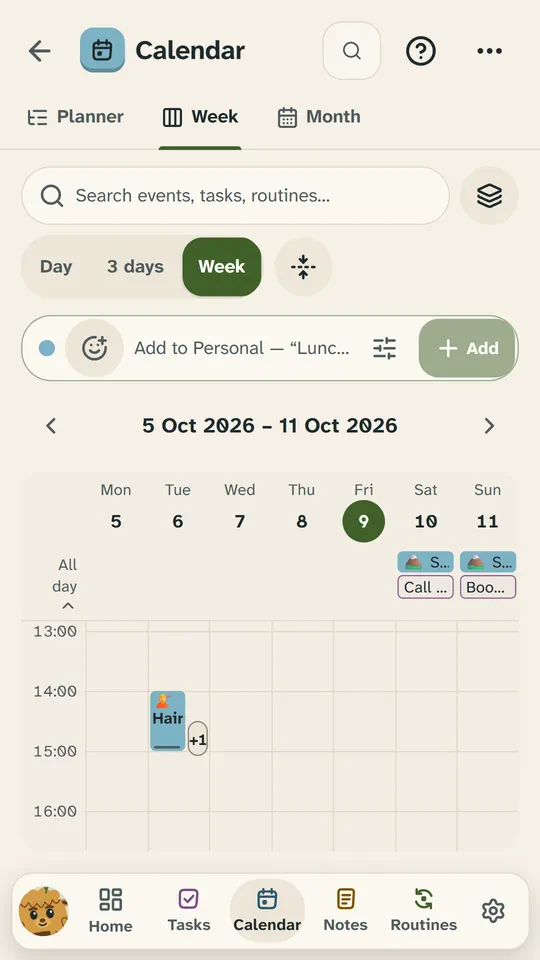
Planner, Week and Month
A new account has three tabs and opens on Month:
- Planner: one day in time order, all-day things first, with a line for now. 30 days lists the month ahead instead.
- Week: your time as columns, as Day, 3 days or Week. Press an empty slot for a new event.
- Month: each day’s first few items. Press a day to see all of it, with Plan this day.
Two more tabs are one switch each in Settings → Calendar → General: Overview (a landing page with today, what’s next and your week) and Sky (the moon, the planets and the wheel of the year). Settings → Calendar → Views → Open Calendar on picks the tab Calendar opens on.
Write it in one line
The quick-add bar sits under the toolbar of the Planner, the Week and the Month. Write an event and press Enter, and chips under the bar show what Snod understood. With no date it goes on the day you’re looking at; with no time it’s all day. For example:
Lunch with Sam tomorrow 1pmDinner with Sam fri 7pm for 2hStandup 9:30-9:45 tomorrow #workYoga every monday 6:30pmMum’s birthday 23 oct
| Write | What it does |
|---|---|
7pm, 19:00, 9:30am | When it starts. With no end it lasts as long as Settings → Calendar → New events → Length says (an hour to start with). |
3-4pm, from 2 to 3pm | A start and an end. In ‘3-4pm’ the pm counts for both. |
noon, midnight | 12:00 and 00:00. |
at 3 | A bare hour needs ‘at’. With ‘at’, 1 to 6 mean the afternoon: ‘at 3’ is 15:00. |
for 2h, for 90 min, 2pm 1h | How long it lasts, from its start time. |
today, tomorrow, tonight | ‘tonight’ is today at 19:00, unless you give a time. |
fri, next tuesday | The coming one (today counts). ‘next’ skips a week. |
in 3 days, next week | ‘next week’ is the first day of next week, by your week start. |
23 oct, 23/10 | A date, day first. With no year, the next one. |
every weekday, every fortnight, every monday | A repeat. With no date typed, it starts today (or on the coming Monday). |
#work | Puts it in that calendar. The start of its name is enough. |
Changed your mind? The ✕ on a chip keeps those words in the title: ‘Lunch at Noon Café’ needn’t be at noon. With more than one calendar, the button at the start of the bar says which one it adds to (“Adding to Work”): press it to choose another. The sliders button opens the full event maker with what you’ve written so far.
How do I change one event of a repeating series?
Change it, move it or delete it, and Snod asks which ones: This event, This and following events, or All events. This event changes just that date; This and following changes that one and the ones after it, and leaves the earlier ones as they were. Each answer has Undo.
To make an event repeat, open it and choose Repeat: every day, every weekday, weekly, monthly, yearly, or Custom… for anything else.
How do I get reminded?
An event can have up to five reminders, from At the start to a week before. New events start with one 10 minutes before: change that in Settings → Calendar → Reminders. An all-day event’s reminders count back from 09:00.
Reminders arrive on time: Brae says it if he’s on the screen, a card shows if he isn’t, and the Android app sends a phone notification when Snod is closed. Not arriving? See Troubleshooting.
How do I move or draw an event?
On the Week, drag an event to another time or day, and drag its bottom edge to change when it ends. Drag across an empty part of the grid to draw a new event; on a phone, hold first, then drag. Every change has Undo.
Right-click an item on a computer, or hold it on a phone, for its card: when, where and its notes, with Edit, Duplicate and Delete for your own events. On the Week and the Month, a finger’s hold shows the whole day instead.
How do I add another calendar?
A new account has Personal. Settings → Calendar → Calendars and layers adds more, like Work or a club, each with its own name and colour. Layers, in the toolbar of the Planner, the Week and the Month, chooses what shows: your calendars, and tasks, routines, holidays and the sky.
How do I show bank holidays?
Settings → Calendar → Holidays and sky has the UK’s bank holidays by nation (England and Wales, Scotland, Northern Ireland) and observances like Burns Night, Mothering Sunday and the clocks changing. The same page puts the moon’s phases, retrogrades, sign changes and the wheel of the year on the Planner, the Week and the Month.
Tasks and routines on the calendar
A task with a due date shows on its day, and an overdue one on today. A routine with a schedule (made in Routines) shows on its days at its time of day, lasting its estimate. Press either to open it.